
How to Sign In to Your DashKing88 Account and Recover Access if You're Locked Out
Signing in is the first move every time you come back to DK88, whether you're topping up your balance or picking up a slot session where you left off. This guide covers what the DK88 login screen asks for, how Google sign-in works, and what to do if a password slips your mind.
What You Need for a DK88 Login
Your account runs on the same credentials you set at registration. Two fields carry your identity every time you sign in, while your phone number and email stay on file as backup contact points rather than fields the login screen itself asks for.
| Field | What We Ask For |
|---|---|
| Username | The name you chose when you opened your DK88 account. |
| Password | Minimum 6 characters, set during DashKing88 registration. |
| Phone number | Not needed to log in, but stored with the +60 Malaysia prefix from signup and used later to help verify your identity. |
| Email address | Also not required at the login screen, though it's one of two contact details we may ask you to confirm before your first withdrawal. |
Only the username and password sit on our sign-in form itself — your phone and email come into play afterwards, mainly around account verification rather than the login step.
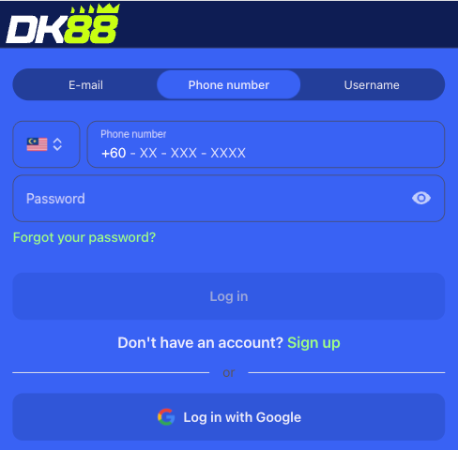
Step-by-Step: Signing In to DK88
Once you've registered with DashKing88, getting back into your account takes a few seconds.
- Open the login form from the top of the site.
- Type in the username you registered with.
- Enter your password (minimum 6 characters).
- Submit the form.
- You'll land on your account dashboard, with your balance, bet history and active promotions all in view.
Signing In With Google to Your DashKing88 Account
If you created your account through "Sign up with Google" at registration instead of filling in a username and password, that same Google account is how you sign back in. There's no separate DK88 password to remember in this case — Google handles the authentication, and DashKing88 recognises the linked account the moment you return. Everything past that point works exactly like a standard login: the same dashboard, the same balance, and the same access to the sportsbook and casino lobby.
The DK88 One-Account Rule
We hold every player to a single account per person on DK88, a rule set out in our Wagering Contract at T&C §3.7. Registering more than one account, including one opened using someone else's details, can lead us to void the Wagering Contract tied to those accounts — the same applies to coordinated groups of accounts, fraudulent transactions or chargebacks, and collusion between users.
Keeping one account also keeps your welcome offers, VIP progress and login history tied to a single identity, so there's rarely a reason to open a second account even after a fresh start — support is the better route for a genuine issue.
Locked Out? Recovering Access to Your DK88 Account
We haven't published a self-service password reset flow for DK88 — there's no "forgot password" link documented on the site. If you can't remember your password or find yourself unable to sign in, contacting our support team directly is the recommended way to recover access to your DashKing88 account.
Keeping your registered phone number and email current matters here, since those are the two contact points we typically use to help confirm your identity during a recovery request. If you originally signed up through Google, recovery works differently: getting back into that linked Google account is what restores your DK88 access, since no separate DK88 password exists for that route.
Keep this separate from the profile-completion form — legal name, date of birth, country, city and a secret question — required before a first withdrawal. That step confirms who you are for payout purposes; a login problem is simply about proving account ownership, and support handles both.
Common DK88 Sign-In Issues
Most login trouble traces back to one of a small number of causes.
| Issue | What To Do |
|---|---|
| Username or password rejected | Check for typos first — both fields are case-sensitive on DK88, and one mismatched character is enough to block sign-in. |
| Registered with Google, but the form wants a password | Use the Google sign-in option instead of typing a username and password — no DK88 password was ever set for that account. |
| Login succeeds, but a withdrawal is blocked | Complete your profile (legal name, date of birth, country, city, secret question) — this sits apart from logging in and only affects withdrawals. |
| Account flagged over multiple accounts | Under T&C §3.7 we may void the Wagering Contract on accounts linked to multi-accounting or fraud; contact support if you believe this was applied to you in error. |
Anything not covered by these four scenarios is best raised directly with our support team, who can look at the specific account.
DK88 Login FAQ
What do I need to log in to DK88?
Your registered username and password. If you signed up through Google, use that linked account instead of typing credentials.
Is there a minimum password length?
Yes — your DK88 password must run at least 6 characters, set when you first registered with DashKing88.
Why does the DK88 phone field use a +60 prefix?
DashKing88 is built around a single market, so the phone field is fixed to the Malaysia country code rather than offering a general country selector.
I forgot my DK88 password — what now?
Contact our support team. We haven't published a self-service reset flow, so support is the most reliable way back into your account.
Can I open a second DK88 account?
No. Our one-account rule under T&C §3.7 lets us void the Wagering Contract on accounts involved in multi-accounting, coordinated activity or fraud.
Does logging in also verify my account for withdrawals?
No. Login only checks your DK88 username and password. Withdrawals separately require completing your profile details first.